
High-Availability Infrastructure: How DevOps & Kubernetes Safeguard Your Legacy Applications
For many established businesses, the software that generates the majority of company revenue is also the most fragile part of the operation. A core e-commerce platform, customer portal, or enterprise resource application built five to ten years ago may still handle daily business logic reliably under normal conditions. Yet the moment a major marketing campaign drives a sudden surge in traffic—or an engineering team attempts to release a routine feature update—the system slows to a crawl or goes offline entirely.
When unplanned downtime strikes, the cost extends far beyond immediate lost sales. It erodes customer trust, penalizes search engine visibility, and pulls senior engineers away from building new product features to fight operational fires.
Faced with these pressures, business leaders are frequently advised to “move to the cloud” or “put the application in Kubernetes.” In practice, however, cloud tools do not fix fragile software architecture automatically. Moving an aging, tightly connected application onto modern cloud servers without addressing how it stores data and handles traffic simply moves the same single points of failure onto a more expensive bill.
Achieving reliable enterprise website uptime requires a structured DevOps cloud deployment strategy—one that evaluates your legacy application honestly, automates how code is tested and released, and uses container orchestration tools like Kubernetes to absorb hardware or software failures before customers ever notice them.
In this guide, you will learn:
- What high-availability infrastructure actually means in plain business and engineering terms.
- Why older legacy applications struggle to stay online during traffic spikes and software updates.
- How to decide whether your application should be rehosted, containerized, incrementally modernized, or rebuilt.
- How DevOps automation and Kubernetes work together—and what Kubernetes cannot fix on its own.
- How engineering teams deploy new software updates with zero downtime, even when databases need to change.
What High-Availability Infrastructure Actually Means in Production
In plain terms, high-availability (HA) infrastructure is a way of designing a website or software system so that it continues working seamlessly for customers even when individual servers, network connections, or software processes break behind the scenes.
Traditional hosting relies on the hope that a server will not fail. High-availability engineering starts from the opposite assumption: hardware components will eventually degrade, cloud virtual machines will occasionally restart without warning, and spikes in user traffic will overwhelm individual processes. Instead of trying to build a single unbreakable server, high-availability architecture spreads the workload across multiple independent components so that no single failure can take the business offline.
To measure whether an infrastructure setup is genuinely delivering high availability, technology teams rely on three metrics defined in Google’s Site Reliability Engineering (SRE) framework:
- Service Level Indicators (SLIs): The real-world health metrics customers actually experience—such as how quickly a page responds (latency) and what percentage of user requests succeed without errors.
- Service Level Objectives (SLOs): The internal reliability target the engineering team commits to maintaining (for example, ensuring 99.95% of all checkout requests complete in under 300 milliseconds across a 30-day window).
- Service Level Agreements (SLAs): The formal business contract with customers or enterprise partners defining minimum guaranteed uptime and the financial credits owed if the system falls below that threshold.
Behind every uptime percentage is a practical operational reality. Moving from 99.0% availability (which allows up to 3.65 days of downtime per year) to 99.99% availability (which allows less than 53 minutes of downtime per year) requires two things:
- Increasing Mean Time Between Failures (MTBF): Designing the system with enough redundancy across separate data centers that a failed component does not interrupt live user traffic.
- Reducing Mean Time to Recovery (MTTR): Using automated monitoring and self-healing orchestration to detect and replace a failed software process in seconds rather than waiting for an engineer to wake up at 3:00 AM and reboot a server manually.
To achieve that level of resilience, high availability must eliminate Single Points of Failure (SPOFs) across four distinct layers of your technology stack:
- The Edge and Network Layer: Global Content Delivery Networks (CDNs), Web Application Firewalls (WAFs), and load balancers that distribute incoming visitors across multiple locations.
- The Compute Layer: Multiple copies of your application running simultaneously across separate physical data centers (known in cloud computing as Availability Zones).
- The Data and Memory Layer: Shared caching systems and replicated databases that ensure customer data remains accessible even if a primary database server goes offline.
- The Deployment Layer: Automated testing and release pipelines that prevent a single human typo from bringing down the live website.
Why Legacy Applications Struggle with Enterprise Website Uptime
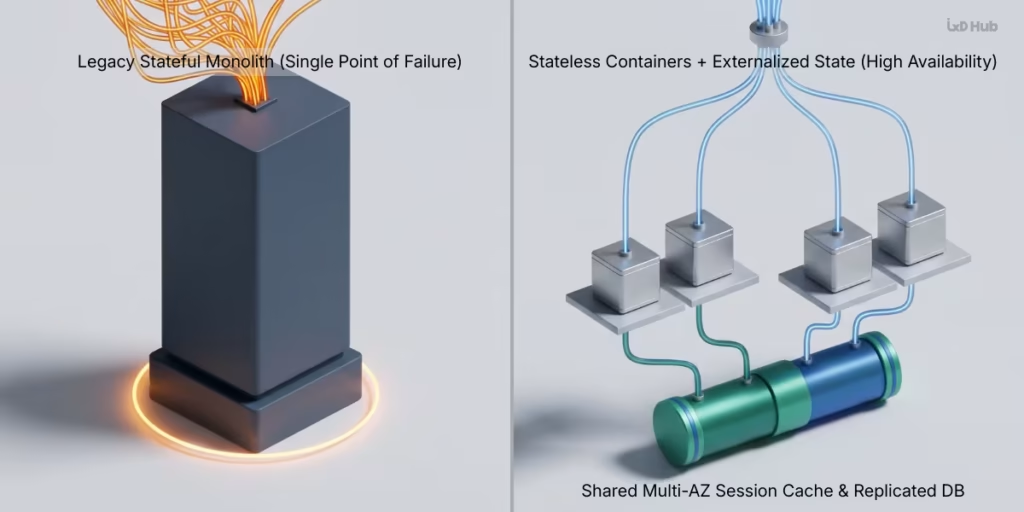
When a legacy application crashes during a peak sales event, business leaders often ask a reasonable question: “Why can’t we just add five more servers when traffic gets busy?”
The answer usually lies in how older software was built. Most legacy applications were designed for an era when companies bought or rented a single large server, installed their software on it, and scheduled maintenance windows late on Sunday nights. Three architectural habits from that era directly block modern high availability.
1. Stateful Local Sessions (The “Trapped Shopping Cart” Problem)
Modern cloud scaling works by treating application servers as interchangeable workers: when traffic doubles, a load balancer adds more servers to share the load; when traffic drops, it turns the extra servers off. This only works if the application is stateless—meaning any server in the group can handle any customer request at any moment.
Many legacy applications, however, are stateful. When a customer logs in or adds an item to their cart, the application saves that session information directly inside the memory or hard drive of the specific server (Server A) that handled their first click. If the load balancer sends the customer’s next click to Server B, Server B has no record of who they are—instantly logging the customer out or emptying their cart.
To work around this, IT teams often configure load balancers to use “sticky sessions,” which permanently tie each visitor to the exact server they started on. While that keeps the app functioning during normal days, it undermines high availability: if Server A runs out of memory and crashes, every single customer pinned to Server A loses their active session immediately.
2. Tightly Coupled Monoliths and Cascading Failures
Legacy systems are frequently built as monoliths—a single, unified codebase where every business function runs inside the same software process and shares the same pool of server memory. User login, product search, credit card processing, and heavy back-office reporting all compete for the exact same resources.
In a tightly coupled monolith, a minor flaw in a non-critical feature can trigger a cascading failure across the entire business. For example, if an internal manager runs a complex quarterly PDF export that accidentally consumes 100% of the server’s available memory, the customer-facing checkout page on that same server will freeze or crash. This operational fragility is a primary reason why enterprise brands are moving away from monolithic architectures toward decoupled systems that separate customer-facing experiences from heavy backend processing.
3. Manual Configuration Drift (“Snowflake Servers”)
In many older IT environments, production servers have been manually maintained over years by different administrators logging in directly to apply quick security patches, update software libraries, or tweak configuration files. Over time, these machines become “snowflake servers”—no two servers are configured identically, and the testing environment no longer matches the live production server.
Because nobody is 100% certain how the live server will react to new code, software deployments become risky, manual events performed late at night. If an update fails, rolling back to the previous version can take hours of manual troubleshooting while the website displays a maintenance page.
Assess Before You Migrate: Choosing the Right Modernization Path
One of the most expensive mistakes an organization can make is assuming that every legacy application should immediately be moved into containers or rebuilt from scratch. Before committing engineering budget, decision-makers should conduct a structured technical assessment of the existing application—evaluating how it manages user sessions, how tightly it depends on specific operating system files, and how frequently the business needs to update it.
Based on that audit, enterprise modernization generally follows one of four practical paths:
| Modernization Approach | How It Works in Plain Terms | Best Suited For | Key Business & Technical Trade-Offs |
| 1. Rehost (Lift & Shift) | Move the existing application onto cloud virtual machines behind managed load balancers and automated backup tools without changing the code. | Stable legacy systems with strict operating-system dependencies or third-party licenses that cannot be modified. | Fastest initial move with minimal code changes, but virtual machines scale slowly (minutes instead of seconds) and cost more to run continuously. |
| 2. Replatform (Containerize & Orchestrate) | Update how the app handles user sessions, configuration, and logs (following Twelve-Factor App principles), package it into containers, and run it on Kubernetes. | Revenue-critical applications whose core business logic works well, but which need faster deployments, automatic recovery, and rapid scaling. | Requires moderate upfront code cleanup to externalize session data and logs, plus experienced cloud engineering oversight. |
| 3. Incremental Refactor (Strangler Fig Pattern) | Keep the legacy system running while gradually carving out high-traffic or high-risk features (like search or checkout) into independent, containerized services. | Large, complex enterprise platforms where a full rewrite would take years and carry unacceptable commercial risk. | Requires managing both the legacy system and new services temporarily, but protects immediate revenue bottlenecks first. |
| 4. Rebuild (Cloud-Native Re-Architecture) | Design and build a modern replacement application using decoupled APIs, modern web frameworks, and cloud-native databases. | Systems built on obsolete, unsupported programming languages that actively block new product lines or security compliance. | Highest upfront investment and longest timeline, but eliminates decades of accumulated technical debt permanently. |
When an assessment shows that a system needs incremental refactoring or a full rebuild, infrastructure planning naturally overlaps with choosing the right website development platform and selecting modern frontend frameworks—such as evaluating Next.js vs. React for SaaS applications. Aligning application code and cloud infrastructure from day one prevents teams from building new bottlenecks into their replacement platform.
How a Continuous Deployment Strategy and DevOps Practices Eliminate Release Risk
Industry studies consistently show that most unplanned outages are not caused by data center power failures; they are caused by human error during routine software updates or server configuration changes. Adopting DevOps engineering practices and a structured continuous deployment strategy replaces manual midnight releases with an automated, predictable software delivery pipeline.
Infrastructure as Code (IaC): Ending Configuration Drift
Instead of having IT administrators click through cloud dashboards or manually configure servers by hand, DevOps teams use Infrastructure as Code (IaC) tools such as Terraform, OpenTofu, or AWS CloudFormation. With IaC, your entire cloud environment—virtual networks, firewall rules, load balancers, Kubernetes clusters, and database settings—is written down in human-readable blueprint files stored in version control.
For an enterprise, Infrastructure as Code delivers three immediate safeguards:
- Identical Environments: Because your testing, staging, and live production environments are built from the exact same digital blueprint, you eliminate the “it worked on our test server, why did it break in production?” problem.
- Peer Review and Audit Trails: Every proposed change to a firewall or server setting is reviewed and approved just like application code before it is applied.
- Rapid Environment Reconstruction: If you ever need to spin up a parallel testing environment or recover from a major configuration mistake, automated scripts can provision the exact infrastructure in minutes rather than days.
Automated CI/CD Quality and Security Gates
Continuous Integration and Continuous Deployment (CI/CD) functions like an automated quality-control assembly line for your software. Whenever a developer writes new code, the CI/CD pipeline automatically packages the application into a standardized, unchangeable unit (an immutable container image) and runs it through a strict series of automated checks before it can ever reach customers:
- Automated Functional Testing: Verifies that new code changes do not accidentally break existing features like user login, pricing calculations, or checkout flows.
- Security and Vulnerability Scanning: Automatically inspects the code and third-party software libraries for known security vulnerabilities or accidentally exposed passwords.
- Staging Verification: Deploys the exact container package to a staging environment for automated performance testing.
If any single test fails, the pipeline stops the release automatically and alerts the engineering team—protecting live website uptime before a bug ever reaches production.
Kubernetes Web Hosting and Container Orchestration: Capabilities vs. Reality
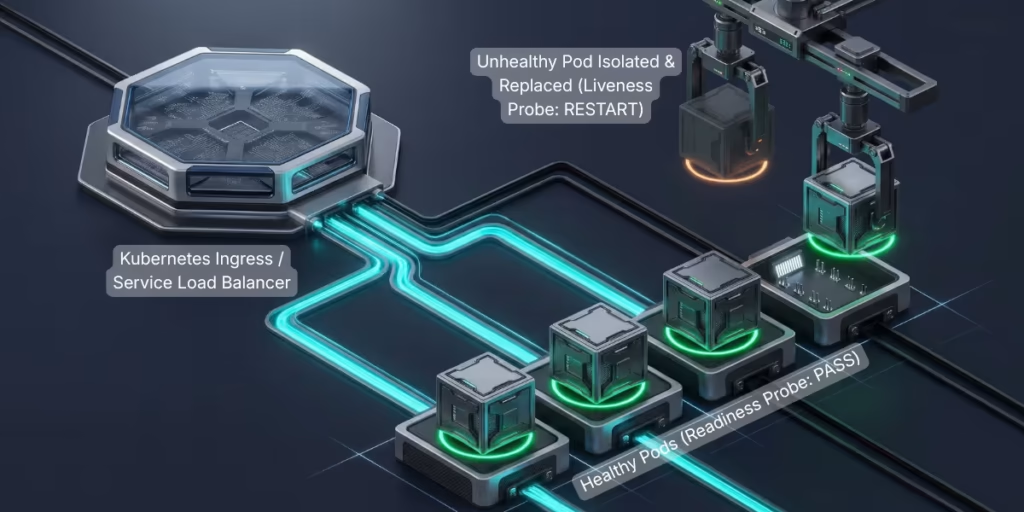
Once a legacy application has been updated to store its session data externally and is packaged through an automated CI/CD pipeline, Kubernetes web hosting becomes one of the most effective ways to maintain high availability. To evaluate Kubernetes properly, however, helps to understand what containers and orchestration actually do—and where their limits lie.
First Principles: What Are Containers and Kubernetes?
Traditionally, running an application required installing it directly onto a server’s operating system alongside dozens of shared system files. If two applications needed different versions of the same system library, they conflicted.
A container solves this by bundling the application code together with all of its required libraries and settings into a lightweight, isolated package. Unlike a heavy virtual machine—which has to boot up a complete copy of Windows or Linux and takes several minutes to start—a container shares the host machine’s underlying operating system kernel and starts up in seconds.
When an enterprise runs dozens or hundreds of these containers across multiple cloud servers, managing them by hand becomes impossible. Kubernetes is a container orchestrator: an automated control system that monitors your pool of cloud servers, decides which server should run each container, restarts containers if they crash, and adjusts the number of running containers as customer traffic rises and falls.
Self-Healing Workloads via Health Probes
In a traditional server setup, a software process might freeze internally due to a memory leak while the server itself still appears “online” to basic monitoring tools—leaving customers staring at spinning loading screens.
Kubernetes prevents this by running three continuous health checks (defined in the official Kubernetes probe specification) against every running application container (which Kubernetes groups into units called Pods):
- Startup Probes (
startupProbe): Older legacy applications often take 30 to 90 seconds to load configuration files when they first start. A startup probe tells Kubernetes to wait patiently until the legacy app finishes booting before running other checks, preventing Kubernetes from prematurely killing a slow-starting app. - Liveness Probes (
livenessProbe): Continuously checks whether the application is still responsive internally. If an application deadlocks, Kubernetes automatically terminates that specific broken container and launches a fresh copy within seconds. - Readiness Probes (
readinessProbe): Checks whether a container is currently ready to accept customer traffic. If a container is temporarily overwhelmed or waiting on a slow external API, Kubernetes temporarily stops sending new visitors to that specific container while leaving healthy containers to handle the load.
Automated Scaling: Pod Scaling vs. Cloud Server Boot Times
Kubernetes scales applications across two levels, and understanding the time difference between them is essential for capacity planning:
- Horizontal Pod Autoscaling (HPA): Monitors real-time CPU usage, memory consumption, or incoming web requests. When traffic climbs, HPA spins up additional application containers on your existing cloud servers in a few seconds.
- Cluster Node Autoscaling: What happens when all of your existing cloud servers are full and Kubernetes has no room to place new containers? At that point, the Cluster Autoscaler (or modern provisioning engines like Karpenter) requests brand-new virtual machines from your cloud provider (such as AWS, Google Cloud, or Azure).
Here is the production catch that many agencies fail to mention: while starting a new container takes seconds, requesting and booting a brand-new cloud virtual machine still takes 60 to 180 seconds. If your business experiences sudden, vertical traffic spikes—such as a flash sale or a broadcast commercial—relying strictly on reactive server scaling can leave a two-minute gap where visitors experience slow loading times.
Experienced cloud architects solve this by pairing Kubernetes autoscaling with headroom buffer capacity (keeping a small reserve of pre-booted server capacity ready to claim instantly) and aggressive edge caching—techniques that also directly help improve website speed and performance for better UX.
What Kubernetes Does Not Solve Automatically
Deploying an application onto Kubernetes does not automatically make it highly available. Out of the box, Kubernetes requires deliberate engineering configuration across three critical areas:
- Multi-Zone Distribution (
topologySpreadConstraints): Unless engineers explicitly configure spread constraints or anti-affinity rules, Kubernetes might place all three copies of your application onto the same underlying cloud server. If that single server fails, your site still goes down. Proper architecture forces Kubernetes to distribute application copies across separate physical Availability Zones. - Pod Disruption Budgets (PDBs): Cloud servers require periodic security upgrades. When Kubernetes drains a server for maintenance, a configured
PodDisruptionBudgetguarantees that Kubernetes will never shut down more than a set fraction of your application pods at the same time—ensuring maintenance never causes an outage. - Resource Requests and Limits: Without strict CPU and memory limits assigned to each container, a single memory leak in a legacy module can consume all available RAM on a host server, starving neighboring applications and triggering system-level crashes.
Zero-Downtime Deployment Strategies and Their Real-World Limitations
For business leaders, one of the most tangible benefits of modernizing infrastructure is eliminating the “Scheduled Maintenance” screen. By combining a CI/CD pipeline with Kubernetes traffic routing, teams can release software updates in the middle of the business day using three proven deployment patterns:
- Rolling Updates: Kubernetes gradually replaces containers running the old version of your software ($v1$) with containers running the new version ($v2$) one or two at a time. It waits until each new container passes its readiness health check before retiring an old container.
- Blue/Green Deployments: Engineers spin up a complete duplicate set of containers running the new version (“Green”) alongside the live version currently serving customers (“Blue”). Once automated tests verify that the Green environment works properly, the load balancer switches live customer traffic from Blue to Green instantaneously. If an unexpected bug appears, traffic switches back to Blue in one click.
- Canary Releases: Named after the “canary in a coal mine,” this strategy routes just 2% to 5% of live visitor traffic to the new software version while 95% of customers stay on the proven version. Automated monitoring compares error rates and conversion metrics between the two groups. Only when the new version proves stable in live production does the system gradually roll it out to 100% of users.
The Hidden Bottleneck: Why Databases Break Naive Zero-Downtime Updates
Rolling updates, Blue/Green switches, and Canary releases work effortlessly for your application containers. However, they all run into a shared architectural hurdle: your production database.
During a rolling update or canary release, both the old version ($v1$) and the new version ($v2$) of your software are running live at the exact same moment, reading from and writing to the same database.
Imagine your development team wants to update how customer names are stored by renaming a database column from customer_name to full_name. If the deployment script renames that column when $v2$ launches, every running $v1$ container still serving customers will immediately crash with database errors because the customer_name column it expects suddenly vanished. Even worse, if you need to roll back $v2$, your old code can no longer work with the altered database.
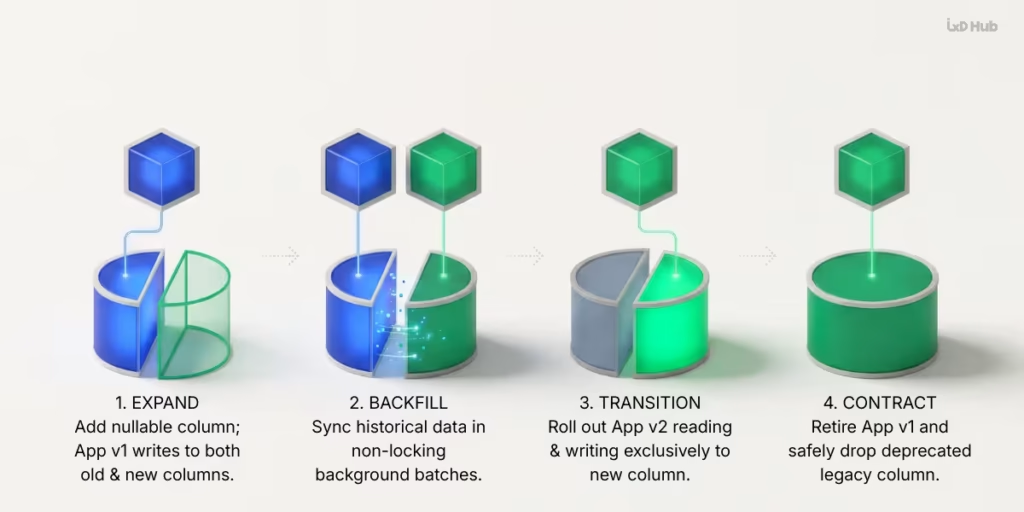
To achieve true zero-downtime deployments on enterprise applications, engineering teams must separate database changes from code changes using the Expand-and-Contract (Parallel Change) Pattern:
- Stage 1 — Expand: Add the new
full_namecolumn to the database without deleting the oldcustomer_namecolumn. Deploy an update where the application writes new customer data to both columns simultaneously while continuing to read fromcustomer_name. - Stage 2 — Backfill: Run an automated background script that copies historical customer records from
customer_nameintofull_namein small batches that do not lock or slow down the live database. - Stage 3 — Transition: Deploy the next application update so the software now reads and writes exclusively using the new
full_namecolumn. (If a rollback is needed at this stage,customer_nameis still intact and up to date.) - Stage 4 — Contract: Once the old version of the application is completely retired from production, safely delete the obsolete
customer_namecolumn during a subsequent release.
This level of coordination between software engineering and database administration is what separates genuine zero-downtime architecture from surface-level cloud hosting.
Reference Architecture: Designing a Resilient Cloud Deployment
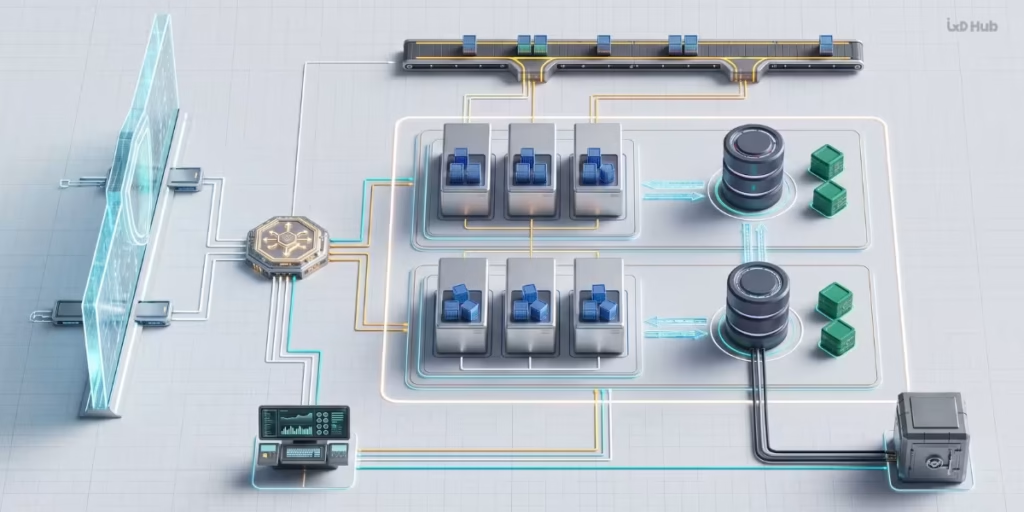
To bring these concepts together, here is how a single customer click flows through a properly engineered, high-availability enterprise cloud architecture:
- Edge Protection and Content Delivery (CDN & WAF): When a user visits your website, their request first reaches a global Content Delivery Network and Web Application Firewall. Static assets (images, stylesheets, scripts) are served instantly from a nearby edge server, while the firewall blocks malicious traffic and Distributed Denial of Service (DDoS) attacks before they ever reach your cloud servers.
- Multi-Zone Load Balancing: Dynamic requests (such as logging in, searching inventory, or checking out) pass through a cloud Application Load Balancer spanning multiple physically isolated Availability Zones.
- Kubernetes Ingress and Stateless Compute: The load balancer routes the request into the Kubernetes cluster through redundant Ingress controllers, which direct the traffic to a healthy, stateless application pod. If traffic surges, the Horizontal Pod Autoscaler adds more pods across multiple worker nodes.
- Externalized Session Cache and Multi-AZ Database: Instead of storing the user’s session on the container’s local disk, the application pod reads and writes session state to a fast, multi-zone in-memory cache (such as Redis). Permanent transaction data is written to a primary relational database that automatically replicates every change to a standby database in a separate Availability Zone. If the primary database hardware fails, the system automatically promotes the standby database within seconds.
- Continuous Delivery and Observability Control Plane: Operating alongside live customer traffic, an automated CI/CD pipeline deploys verified updates from a private container registry, while centralized monitoring tools track system performance and security controls enforce strict access boundaries.
Observability, Security Hardening, and Disaster Recovery
Keeping a mission-critical application resilient over the long term requires three operational pillars working continuously in the background: visibility into system health, layered security controls, and verified disaster recovery.
1. Actionable Observability and Incident Response
In a legacy single-server setup, IT teams often monitored only whether the server was powered on and how much disk space remained. In a distributed cloud environment where containers start and stop dynamically, teams need comprehensive observability across three signals:
- Metrics: Real-time dashboards tracking request latency, error rates, CPU/memory saturation, and database connection pools.
- Centralized Logging: BecauseKubernetes destroys and replaces unhealthy containers automatically, any error logs stored inside a container disappear when that container terminates. Centralized log pipelines automatically ship every container log to an external, searchable vault in real time.
- Distributed Tracing: Tracks a single customer request as it travels across your frontend, backend API, cache, and database—allowing engineers to see immediately whether a slow page load is caused by an unoptimized database query or a slow third-party payment gateway.
2. Security Hardening and Access Control
Moving to containers introduces new security responsibilities. Following enterprise standards outlined in the NIST SP 800-190 Application Container Security Guide, a hardened Kubernetes environment enforces defense-in-depth across four boundaries:
- Role-Based Access Control (RBAC): Restricts both human engineers and automated software services to the minimum permissions required to perform their jobs (least privilege).
- Kubernetes Network Policies: By default, every container inside a Kubernetes cluster can communicate over the internal network with every other container. Engineers configure strict
NetworkPolicyfirewalls (micro-segmentation) so that a public-facing web container can never communicate directly with sensitive internal services or databases unless explicitly permitted. - Non-Root Container Execution: Configures containers so they never run with administrative (
root) privileges and locks their system folders as read-only—preventing an attacker from modifying system files if an application bug is exploited. - External Secrets Management: Database passwords, API keys, and encryption certificates are never stored inside application code or container files. Instead, they are held in encrypted cloud vaults and injected securely into memory only when an authorized container starts.
3. Backup, Restore Verification, and Disaster Recovery (HA vs. DR)
Technology leaders must maintain a clear distinction between High Availability (HA) and Disaster Recovery (DR):
- High Availability keeps your application online automatically when an individual component fails (such as a crashed container, a failed server node, or a single data center power outage).
- Disaster Recovery is your insurance policy against catastrophic events that redundancy alone cannot stop—such as ransomware attacks, accidental deletion of production data, or a major regional natural disaster. Notice how database replication acts as a double-edged sword here: if a bug or attacker accidentally deletes a table in your primary database, high-availability replication will faithfully copy that deletion to your standby database in milliseconds.
As detailed in the AWS Well-Architected Reliability Pillar, every enterprise disaster recovery strategy must be designed around two business targets defined by executive leadership:
- Recovery Point Objective (RPO): How much recent data can the business afford to lose in a worst-case disaster? An RPO of 5 minutes requires continuous point-in-time transaction log backups, whereas an RPO of 24 hours only requires a nightly snapshot.
- Recovery Time Objective (RTO): How quickly must the application be restored and serving customers after a catastrophic outage?
Above all, an untested backup is not a disaster recovery plan. Mature DevOps pipelines automatically spin up isolated test environments from encrypted backup snapshots on a regular schedule to prove that backups can actually be restored within the required RTO window.
When Should Your Organization Evaluate Infrastructure Modernization?
Not every business application needs the complexity of a multi-zone Kubernetes cluster. If an internal software tool serves 150 employees during normal office hours and can comfortably pause for maintenance on Saturday nights, a simpler managed cloud hosting setup is often the smartest financial choice.
However, executive and technical leaders should prioritize an infrastructure and DevOps modernization audit when two or more of the following warning signs appear:
- Traffic Success Causes Technical Failure: High-visibility marketing campaigns, seasonal demand peaks, or enterprise client onboarding repeatedly cause slow page response times or site outages.
- Release Fear and Feature Delays: Product updates are delayed or batched into risky monthly releases because deployments require scheduled downtime or frequently break existing features.
- Slow Recovery from Incidents: When an error occurs in production, diagnosing the root cause and restoring normal operations takes hours of manual investigation by senior developers.
- Escalating Security and Compliance Requirements: Enterprise customers, cyber-insurance providers, or regulatory frameworks require documented disaster recovery testing, automated vulnerability scanning, and strict network isolation that your legacy hosting cannot support.
Taking the Next Step: Start with an Architectural Discovery Audit
Modernizing a revenue-generating legacy application while keeping daily operations running requires careful coordination across software engineering, database architecture, and cloud infrastructure.
As a full-service digital agency and technology partner, IxD Hub helps CTOs, founders, and enterprise IT leaders modernize complex web applications and cloud environments without putting active business operations at risk. Rather than pushing a one-size-fits-all hosting template, our engineering team starts with a structured architectural assessment—evaluating your codebase, database dependencies, traffic patterns, and operational bottlenecks to recommend the right balance of DevOps automation, container orchestration, or platform refactoring. You can review examples of our digital engineering work in our client portfolio.
If you are planning to modernize a legacy application, eliminate deployment downtime, or design a high-availability cloud architecture, connect with our engineering team through our Contact Page or message us directly on WhatsApp to discuss your project requirements.
Frequently Asked Questions (FAQs)
1. Does moving a legacy application to Kubernetes guarantee 100% or 24/7 uptime?
No single tool can guarantee 100% uptime on its own. While Kubernetes automates container restarts, health checks, and horizontal scaling, it cannot protect an application that stores user sessions locally on a single server or relies on an un-replicated database. Achieving near-continuous enterprise uptime requires combining Kubernetes with stateless application design, multi-zone server distribution, Pod Disruption Budgets, and replicated databases with automated failover.
2. What is the difference between High Availability (HA) and Disaster Recovery (DR)?
High Availability is an architectural setup that keeps an application running continuously by automatically routing live traffic around localized failures—such as a crashed container or a single failed cloud server. Disaster Recovery is the process and backup architecture used to restore data and operations after a major catastrophe—such as ransomware, accidental data corruption, or an entire cloud region going offline—measured by your organization’s Recovery Point Objective (RPO) and Recovery Time Objective (RTO).
3. How do zero-downtime deployments work when an application update requires database changes?
During zero-downtime rollouts like Rolling Updates or Canary releases, both the old version and the new version of the software run simultaneously against the same live database. To prevent crashes, engineering teams use the Expand-and-Contract pattern: first adding new database columns without removing old ones, migrating historical data in the background, updating the application code to use the new schema, and only deleting obsolete database columns in a later release after the old application version is fully retired.
4. Is Kubernetes always the right choice for enterprise web hosting?
No. Kubernetes is ideal for organizations managing business-critical applications with variable traffic, frequent software releases, or multiple interconnected services that require automated scaling and self-healing. However, Kubernetes requires ongoing operational expertise. For smaller applications with predictable traffic and tolerance for brief maintenance windows, simpler managed cloud platforms (PaaS) can often deliver reliable performance with lower management overhead. A pre-migration technical assessment helps determine the most cost-effective fit.