

Custom Software vs. Off-the-Shelf: When to Build Your Enterprise Tools (And When to Buy)
In the early stages of a growing business, buying ready-made software is almost always the right move. You subscribe to an accounting platform, a standard Customer Relationship Management (CRM) system, and a team project tracker, and your staff is up and running within days.
As your organization expands, however, the software that once accelerated your growth often becomes a daily bottleneck. Operations managers find their teams clicking through clumsy five-step workarounds because the software does not match how your company actually delivers its services. Finance leaders watch annual subscription renewals balloon as per-user pricing tiers and mandatory add-ons multiply. Worse yet, critical customer and inventory information ends up scattered across four or five separate platforms that refuse to talk to one another—forcing employees to spend hours copying and pasting data across spreadsheets by hand.
When those friction points mount, leadership teams face a pivotal investment decision: custom software vs. off-the-shelf tools. Should you switch to another commercial software vendor, customize and connect the platforms you already use, or invest in building your own custom enterprise application?
Choosing the wrong path carries real financial risk. Staying trapped inside rigid off-the-shelf tools when your business relies on specialized workflows quietly erodes employee productivity and customer satisfaction. On the other hand, rushing to build custom software from scratch for a routine business function can tie up capital in months of unnecessary development, hosting, and ongoing maintenance.
This guide gives business owners, operations leaders, CTOs, and IT decision-makers a clear, balanced framework to evaluate custom software vs. off-the-shelf solutions. You will learn:
- How off-the-shelf software, hybrid customization, and custom application development work behind the scenes.
- How to separate everyday “utility” software (which you should almost always buy) from strategic software (which justifies building).
- What actually causes business data silos—and how APIs and custom middleware fix them.
- How to calculate the true 5-year Total Cost of Ownership (TCO) beyond initial subscription fees or build quotes.
- How modern technologies like React and Node.js work in custom business applications—and when they are (or aren’t) the right technical fit.
- How to score your own software project using our Build vs. Buy Assessment Matrix.
Defining the Core Options: Off-the-Shelf vs. Custom Software Development
Before comparing budgets and technical trade-offs, it helps to establish what each approach actually means in practice.
What Is Off-the-Shelf Software?
Off-the-shelf software—often referred to as Commercial Off-the-Shelf (COTS) software or packaged Software-as-a-Service (SaaS)—is a pre-built application created for the mass market. Platforms such as Salesforce, HubSpot, QuickBooks, SAP, Jira, and Shopify are built once by a software vendor and leased to thousands of businesses simultaneously.
Think of off-the-shelf software like leasing an office floor in a large commercial building. The building is already standing, the elevators and security systems are managed by the landlord, and your company can move in immediately for a predictable monthly rent. Because the software vendor spreads its engineering and server costs across thousands of customers (an approach called multi-tenant architecture), your upfront cost is low. The trade-off is structural: you cannot knock down load-bearing walls or redesign the building’s plumbing. If the vendor’s layout does not fit how your team works, your team must adapt to the building.
What Is Custom Software Development?
Custom application development is the process of designing, building, and deploying software specifically for your organization’s workflows, business rules, user roles, and data structures. Common examples include tailored supply-chain and fleet-dispatch platforms, specialized manufacturing floor systems, custom B2B customer and dealer portals, and automated underwriting or quoting engines.
In our real estate analogy, bespoke enterprise software is like hiring an architectural firm to build a purpose-designed facility around your exact operational floor plan. Every room, workflow step, and security gate is engineered for how your business operates. Your company owns the intellectual property (IP), controls when and how features change, and never pays per-user licensing fees to an outside software vendor. In exchange for that control, however, your organization takes on the responsibility of funding the construction and maintaining the building over its lifespan.
The Utility vs. Strategic Rule: A Clear Lens for the Build vs. Buy Decision
Why do some custom software projects create a decisive competitive advantage while others turn into frustrating budget sinks? Veteran software architect Martin Fowler frames this distinction through the Utility vs. Strategic Dichotomy.
Every activity inside your company falls into one of two buckets:
- Utility Processes (Business Parity): These are standard, everyday functions that every business must perform accurately, but doing them differently from your competitors does not win you extra market share. General ledger accounting, standard payroll processing, basic employee time-off requests, and standard document storage are utility processes. Customers do not choose your company because you invented a clever new way to calculate employee payroll taxes.
- Strategic Processes (Competitive Differentiation): These are the core workflows, pricing formulas, service-delivery methods, or customer experiences that make your business faster, more profitable, or easier to buy from than your competitors. For a specialized medical logistics company, real-time cold-chain routing and automated customs documentation are strategic processes. For a custom industrial manufacturer, an interactive specification and dealer-quoting engine is a strategic process.
Applying this distinction simplifies the build vs. buy software decision:
Buy off-the-shelf software by default for standard utility functions where working like everyone else in your industry is fine. Invest in custom software development—or custom extensions—where the workflow is central to your competitive advantage, revenue margins, or customer experience.
Evaluating Off-the-Shelf Software: Strengths and Operational Limits
A fair evaluation starts by recognizing why commercial software is the default choice for most standard business needs—and identifying the exact point where growing companies outgrow it.
When Off-the-Shelf Software Is the Smartest Choice
- Fast Time to Launch: Because the software is already built and tested, businesses can configure an off-the-shelf tool and onboard their staff in weeks rather than months.
- Low Upfront Capital Commitment: Instead of funding a major capital project before seeing a working screen, companies pay a predictable monthly or annual subscription fee.
- Built-In Industry Templates: When a company is setting up a new department—such as its first structured HR onboarding flow or standard B2B sales pipeline—commercial software provides proven workflows out of the box.
- Vendor-Managed Maintenance and Uptime: The software vendor is responsible for keeping servers online, patching operating systems, backing up databases, and maintaining baseline security certifications.
Where Growing Businesses Hit the Off-the-Shelf Ceiling
As organizations grow in headcount and operational complexity, off-the-shelf platforms frequently create four expensive problems:
- Compounding Per-User and Tier Pricing: Most SaaS vendors price their software per user (“per seat”) and divide features across pricing tiers. A plan that costs $40 per user for 20 employees can suddenly jump to $120 per user when your company grows to 150 staff members and requires enterprise features like Single Sign-On (SSO), granular user permissions, or higher data-sync limits. If you want to give 1,500 external customers, suppliers, or contractors access to a portal, per-user fees quickly become prohibitive.
- Workflow Friction and Cluttered Screens: Because commercial software is built to serve dozens of different industries at once, most companies use only a small fraction of the buttons and menus on screen—while still lacking the specific approval rules or calculations their business actually needs. Employees end up clicking through bloated screens and keeping side spreadsheets to finish their daily work.
- Shared Platform Constraints: Because all customers share the same underlying software architecture, you cannot customize how the database indexes your records or how fast complex reports run. That same trade-off between pre-packaged templates and long-term architectural freedom is why digital leaders carefully evaluate choosing the right website development platform as their digital footprint matures.
- Vendor Lock-In and Roadmap Dependency: When you rely on a commercial vendor, your operations are tied to their business priorities. If the vendor raises annual renewal prices by 25%, discontinues a feature your team uses daily, or is acquired by a larger conglomerate that slows down support, migrating years of historical records to a new system can be disruptive and costly.
Evaluating Bespoke Enterprise Software: Strategic Control vs. Ownership Realities
When the cost of manual workarounds and escalating subscription tiers outweighs the convenience of commercial tools, custom application development offers a path to full operational control—provided decision-makers plan for the realities of software ownership.
Why Organizations Invest in Custom Business Applications
- Software Built Around Your Exact Workflow: Instead of changing your company’s proven operational processes to fit a software vendor’s template, a custom application is designed around the exact steps your employees and customers take. Multi-stage approvals, specialized margin calculations, and automated compliance checks happen in the background without manual effort.
- Unlimited Users Without Per-Seat Penalties: When your company owns the software, adding 300 new employees or giving 5,000 external B2B clients access to a self-service portal does not add a single dollar in software licensing fees. Your only variable cost is the underlying cloud server capacity, which costs a fraction of per-seat SaaS pricing.
- Full Intellectual Property (IP) Ownership: Custom software turns your unique business processes into a proprietary asset on your company’s balance sheet—one that competitors cannot copy simply by subscribing to the same vendor.
- Unrestricted Hardware and Legacy System Connections: Custom applications can be programmed to communicate directly with older on-premise databases, factory-floor machinery, barcode scanners, or specialized regional banking systems that mainstream cloud tools do not support.
The Real Responsibilities of Building Custom Software
To evaluate custom development honestly, leadership teams must plan for four ongoing obligations:
- Higher Upfront Investment and Lead Time: Designing, engineering, testing, and launching a reliable enterprise application requires upfront capital and typically takes three to nine months depending on complexity—though launching a focused Minimum Viable Product (MVP) first can deliver value much sooner.
- Scope Creep Risk: Custom projects run over budget when teams try to build every conceivable feature in Version 1.0 or change requirements mid-stream without disciplined product management.
- Ongoing Maintenance, Hosting, and Security: Custom software is never “build once and walk away.” Web browsers update, security standards evolve, and cloud servers require monitoring. In enterprise financial planning, organizations should budget 15% to 20% of the initial development cost per year for ongoing maintenance, security updates, and incremental enhancements.
- Partner and Documentation Governance: To avoid becoming dependent on a single developer, custom software must be built using widely adopted, open frameworks with clean documentation and automated testing so any qualified engineering team can maintain it.
Understanding Data Silos, APIs, and Enterprise Application Integration
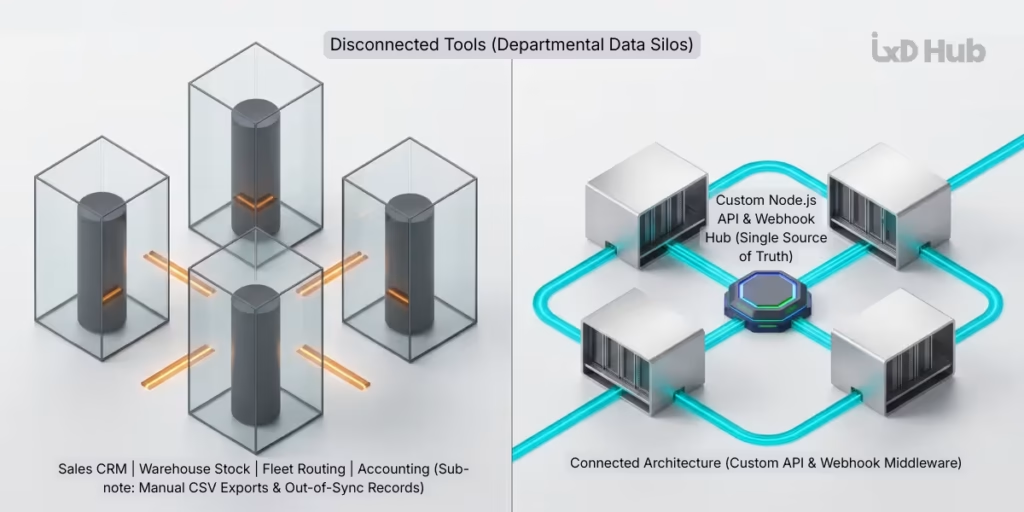
One of the strongest triggers for evaluating custom software is frustration over business data silos. To solve this problem cost-effectively, business leaders need to understand why data silos form and how modern software integration works.
What Actually Causes Data Silos?
In plain English, a data silo happens when critical business records are trapped inside one department’s software tool and cannot be automatically seen or updated by other departments that rely on the same information.
Consider a common scenario in a growing manufacturing and distribution company using four separate off-the-shelf tools:
- The Sales Team records customer orders inside a cloud CRM.
- The Warehouse Team tracks stock levels in a standalone inventory program.
- The Operations Team schedules deliveries in a fleet-routing tool.
- The Finance Team sends bills from an accounting package.
Because these four tools do not share data automatically, a salesperson might promise a rush delivery on an item that the warehouse just ran out of ten minutes ago. Meanwhile, a bookkeeper spends every Friday afternoon exporting CSV spreadsheets from the CRM and re-typing invoice lines into the accounting software—introducing human typos and delaying cash collection.
It is important to recognize a key technical truth: off-the-shelf software does not automatically cause data silos, and building custom software does not automatically prevent them. Data silos happen when tools are purchased in isolation without an integration plan, or when a commercial vendor restricts how external systems can exchange data with their platform.
How APIs, Webhooks, and Custom Middleware Connect Your Business
Modern software systems exchange information automatically using two core mechanisms:
- Application Programming Interfaces (APIs): If a software program’s visual screen (menus, buttons, and forms) is built for humans to read and click, an API is a secure, structured doorway built for one software program to talk directly to another software program behind the scenes. When your e-commerce checkout asks a shipping carrier for live freight rates in half a second, it uses an API.
- Webhooks (Instant Event Triggers): Instead of one program constantly asking another program “Did anything change yet?” every minute, a webhook is an automated alert sent the exact millisecond an event occurs—for example, automatically notifying the warehouse software and the accounting tool the instant a customer signs a digital contract.
Why do businesses still run into integration walls with off-the-shelf tools if APIs exist? Technical teams frequently uncover three hidden barriers during software audits:
- Incomplete API Coverage: Many commercial software products only expose basic data fields through their API, locking away specialized custom fields, pricing tables, or approval statuses so external programs cannot read or update them.
- API Rate Limits and Throttling: To protect their shared servers, SaaS vendors restrict how many API messages your company can send per minute (a restriction called rate limiting) or charge expensive add-on fees for high-volume data syncing.
- Incompatible Data Formats: When your CRM stores customer accounts one way and your legacy ERP database expects data structured a completely different way, standard plug-and-play connectors fail.
By building a lightweight custom middleware service—or adopting a decoupled architecture similar to how enterprise brands use headless architectures to replace rigid monoliths—engineers create a central translation hub. That hub receives real-time webhooks, translates data formats automatically, respects security rules, and ensures every department works from a single, accurate source of truth.
Total Cost of Ownership (TCO): Looking Beyond Initial Price Tags
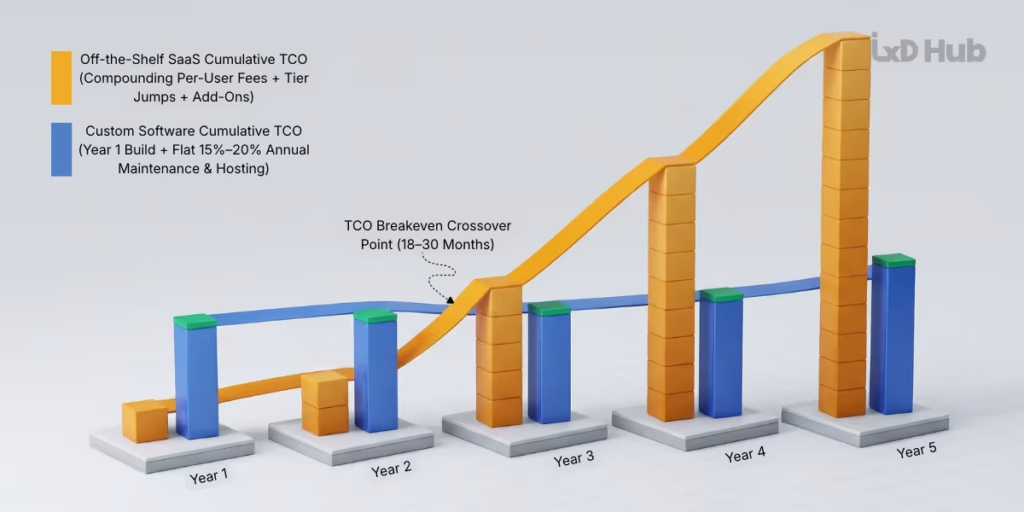
Comparing Year 1 SaaS subscription fees against a Year 1 custom software development quote is like comparing the first month’s rent on an office lease against the full construction cost of owning a building. To make a sound financial decision, CFOs and technology leaders evaluate software total cost of ownership (TCO) over a 3-to-5-year lifecycle.
The Complete Cost Breakdown: Buying vs. Building
| Cost Category | Off-the-Shelf Software (Buy) | Custom Enterprise Software (Build) |
| Upfront Entry Cost | Low to Moderate: Initial setup, data migration, and vendor onboarding fees. | High: Architecture discovery, UI/UX design, full-stack coding, and quality assurance testing. |
| User Licensing & Scaling | Compounding Recurring Cost: Per-user monthly fees, mandatory tier upgrades, and paid external portal seats that grow every time you hire or expand. | $0 Per-User Fees: Unlimited internal staff and external customer/vendor users without per-seat license charges. |
| Customization & Integration | Ongoing Add-On Cost: Paid marketplace plugins, third-party integration subscriptions, and consultant fees for complex workarounds. | Built Into Architecture: Native API connections to your exact databases and tools engineered upfront. |
| Hosting & Infrastructure | Included in Subscription: (Though extra data storage blocks and API call packs often carry surcharges.) | Direct Cloud Bill: Monthly AWS, Google Cloud, or Azure server and database usage (scales predictably with actual traffic). |
| Maintenance, Security & Support | Included (Standard) or Tiered: Core updates handled by the vendor; priority enterprise support SLAs often cost extra. | Planned Annual Budget: Typically 15% to 20% of initial build cost per year for server monitoring, security patching, and feature updates. |
| Hidden Productivity Cost | Often High: Staff hours lost to manual spreadsheet reconciliation and multi-step workarounds when software fits poorly. | Minimal: Screens and automations are tailored to eliminate manual data re-entry and speed up task completion. |
| Contract Renewal & Exit Risk | High: Exposure to annual renewal price hikes (often 7%–15% per year) and complex data extraction when switching vendors. | Low: You own the source code, database schema, and intellectual property outright on open industry standards. |
An Illustrative 5-Year TCO Comparison
Note: The table below is a hypothetical, illustrative financial example showing how cost curves behave for a mid-sized business. Actual software pricing and engineering investments depend on your exact user count, functional scope, and compliance requirements.
Scenario Assumptions: A growing B2B enterprise needs an order-management, custom pricing, and client-tracking platform for 120 internal employees and 800 external B2B client portal users.
- Option A (Off-the-Shelf Enterprise SaaS): Costs $110/user/month for 120 internal staff ($158,400/year), plus $24,000/year for external client portal user packs and middleware connectors, a $25,000 Year 1 setup fee, and an 8% annual subscription renewal increase.
- Option B (Custom Enterprise Web Application): Costs $160,000 upfront to design, build, test, and integrate in Year 1, plus $15,000/year in cloud hosting/utility APIs and $28,800/year (18% of initial build budget) for ongoing maintenance, security updates, and support.
| Ownership Year | Option A: Off-the-Shelf SaaS (Annual Cost) | Option A: Cumulative Spend | Option B: Custom Application (Annual Cost) | Option B: Cumulative Spend |
| Year 1 | $207,400 (Licenses + Portal + $25k Setup) | $207,400 | $203,800 ($160k Build + $43.8k Hosting/Maint) | $203,800 |
| Year 2 | $196,992 (+8% Renewal Increase) | $404,392 | $43,800 (Cloud Hosting + 18% Maintenance) | $247,600 |
| Year 3 | $212,751 (+8% Renewal Increase) | $617,143 | $43,800 (Cloud Hosting + 18% Maintenance) | $291,400 |
| Year 4 | $229,771 (+8% Renewal Increase) | $846,914 | $43,800 (Cloud Hosting + 18% Maintenance) | $335,200 |
| Year 5 | $248,153 (+8% Renewal Increase) | $1,095,067 | $43,800 (Cloud Hosting + 18% Maintenance) | $379,000 |
The Key Financial Takeaway: If your business only has 10 users paying $40/month ($4,800/year) for a simple tool, spending $160,000 to build custom software makes zero financial sense—buying off-the-shelf wins hands down. However, once your organization scales past 50 to 100 internal users, needs external client/vendor portal access, or loses hundreds of staff hours each month to clumsy workarounds, custom software frequently reaches its breakeven crossover point within 18 to 30 months, delivering substantial savings over a five-year horizon.
Build vs. Buy vs. Customize: The Hybrid Middle Path
In practice, smart technology leaders rarely treat build vs. buy as an all-or-nothing choice. Often, the highest-return investment is a third option: the Hybrid (“Buy and Extend”) Approach.
Instead of throwing away an existing accounting system, CRM, or ERP that already stores core records reliably, a hybrid strategy keeps your commercial software as the back-office foundation while building targeted custom software around it to solve specific bottlenecks:
- Custom Customer or Vendor Self-Service Portals: Rather than paying exorbitant per-user SaaS portal fees—or exposing a confusing back-office system to your clients—you build a fast, branded custom web portal where customers can place orders, upload compliance documents, and track live status updates. Behind the scenes, the custom portal syncs directly with your existing back-office database via an API.
- Unified Role-Based Operations Dashboards: If your fulfillment managers currently have to keep four browser tabs open across four separate SaaS tools to approve an order, engineers can build a single custom operations screen that pulls live information from all four systems into one streamlined view.
- Automated Rules and Integration Middleware: You keep your commercial tools, but build a lightweight custom backend service that connects them, runs your proprietary pricing or routing calculations automatically, and eliminates manual spreadsheet exports.
For many organizations, this hybrid path solves their most painful operational bottlenecks in half the time and at a fraction of the cost of replacing their entire software stack.
Inside a Modern Custom Stack: How Node.js and React Power Enterprise Applications
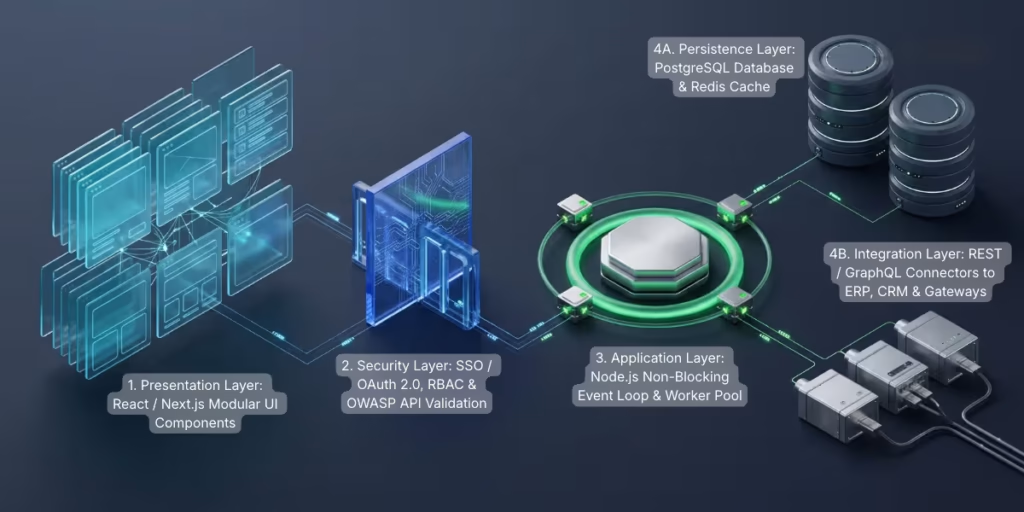
When your evaluation shows that building a custom application—or a custom hybrid portal—is the right business move, the next step is choosing a technology stack that is fast to build, reliable under heavy traffic, and easy to maintain over the next decade.
For modern web-based enterprise applications, pairing React on the user interface with Node.js on the server backend has become a proven industry standard. Here is how both technologies work in plain English, followed by the architectural details technical leaders care about.
1. React on the Frontend: Fast, Interactive Screens for Complex Workflows
Foundation (What It Is): The frontend is everything a user sees and interacts with inside their web browser—dashboards, search tables, interactive charts, and multi-step forms. React (originally developed by Meta and maintained by a massive open-source community) is a library designed to build highly responsive user interfaces.
How It Works & Why It Matters: In older web applications, clicking a filter or updating a single number in an order form forced the web browser to reload the entire page from the server, causing a frustrating screen flash and a two-second pause on every click.
As explained in the official React architecture documentation, React solves this by breaking a complex screen down into independent, reusable building blocks called components (such as a search bar, a pricing table, or an approval button) and tracking what the user is currently doing in real-time memory (known as application state):
- When an operations manager changes a shipping tier or filters a 5,000-row table, React calculates the exact change in memory and updates only that specific row or badge on screen in milliseconds—without reloading the page.
- Because components are modular and reusable, your engineering team can build a secure data table or approval workflow once and reuse it across multiple internal tools and client portals, reducing long-term development costs.
- When a custom application also needs fast initial page loads, server-side rendering (SSR), or search engine visibility, engineering teams often evaluate Next.js vs. React for SaaS and enterprise applications to select the right frontend architecture for the project.
2. Node.js on the Backend: High-Speed APIs and Real-Time Coordination
Foundation (What It Is): While React runs in the user’s browser, Node.js runs on the cloud server (the backend). It is responsible for checking user permissions, running business calculations, saving records to the database, and talking to external software APIs.
How It Works & Why It Matters: To understand why Node.js is so effective for business applications, imagine how two different restaurants handle customer orders:
- Traditional Blocking Servers: Imagine a restaurant where a waiter takes one table’s order, walks to the kitchen window, and stands there frozen for ten minutes waiting for the chef to finish cooking before walking to the next table. If 500 customers arrive at once, you have to hire 500 waiters—quickly running out of room and budget. In software terms, traditional servers assign a dedicated memory thread to wait idly while a database or external API looks up information.
- The Node.js Non-Blocking Event Loop: Node.js acts like a highly efficient coordinator. When a user requests a report that requires querying a database and checking a shipping API, the Node.js Event Loop hands that ticket to the database and immediately moves on to serve the next user request without waiting around. The millisecond the database finishes retrieving the data, Node.js picks up the result and sends it back to the user’s screen.
Enterprise Benefits of Pairing Node.js and React:
- High Concurrency with Lower Cloud Bills: Because enterprise applications spend most of their time reading and writing database records, calling external APIs, and generating real-time notifications, Node.js can handle thousands of simultaneous users smoothly using fewer cloud servers. That backend efficiency directly supports broader efforts to improve website and application speed for better UX.
- One Unified Programming Language (JavaScript / TypeScript): Historically, companies had to hire one team of developers writing Java or PHP for the backend and a separate team writing JavaScript for the frontend. With Node.js and React, the entire application is written in TypeScript (a strongly typed, enterprise-safe version of JavaScript). Frontend and backend code can share the exact same data validation rules, reducing bugs and speeding up delivery.
3. Technical Trade-Offs: When Node.js and React Are (and Aren’t) the Right Fit
No technology stack is universal, and architecture must always follow your specific workload:
- Handling Heavy CPU Math: Because Node.js processes requests through a single main Event Loop coordinator, asking that main thread to run heavy, continuous mathematical calculations—such as video rendering, complex image processing, or heavy AI model training—will slow down responses for other users. As the official Node.js guide on avoiding Event Loop blocking explains, experienced architects offload heavy number-crunching to background Worker Threads, message queues, or dedicated microservices written in languages like Python or Go.
- Building Security In from Day One: When you build a custom application, you are responsible for securing it. Production Node.js and React applications must be engineered to enforce Role-Based Access Control (RBAC), encrypted token login (OAuth 2.0 / OIDC), strict input validation, and API protection aligned with the OWASP Top 10 application security standards and OWASP API security guidelines.
The Build vs. Buy Assessment Matrix and Decision Scorecard
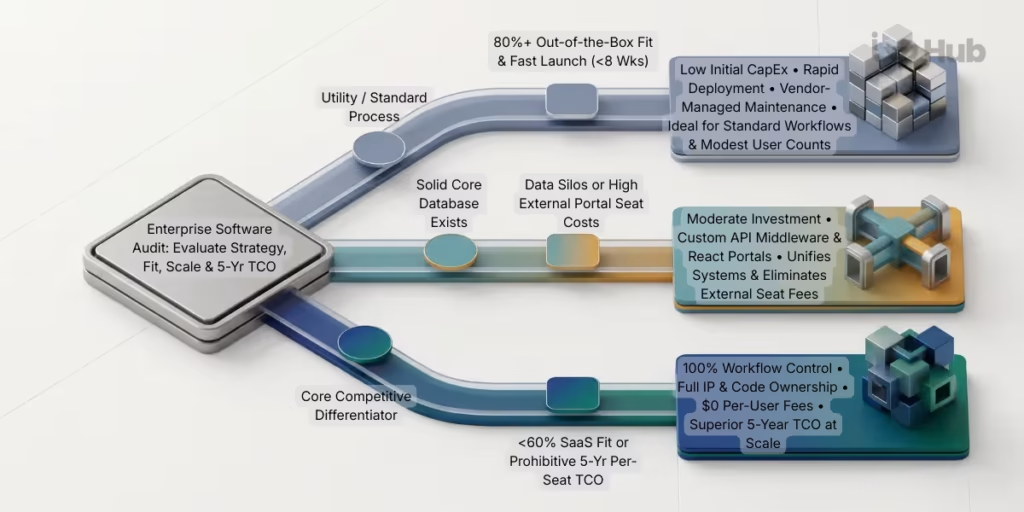
Use the reference matrix and weighted scoring guide below with your leadership team to evaluate whether your next software initiative belongs in the Buy, Customize (Hybrid), or Build column.
1. Side-by-Side Comparison Across 13 Evaluation Factors
| Evaluation Factor | 1. Buy Off-the-Shelf (Commercial SaaS / COTS) | 2. Customize / Hybrid (Extend Existing Tools) | 3. Build Custom Software (Bespoke Application) |
| 1. Initial Investment | Low: Minimal upfront cost; mostly setup, configuration, and staff training. | Moderate: Base platform subscription plus targeted engineering for APIs or custom portals. | High: Upfront capital investment for discovery, UI/UX design, coding, and testing. |
| 2. Recurring Licensing Costs | High & Compounding: Per-user monthly fees, tier jumps, and annual renewal price increases. | Moderate: Core back-office licenses plus modest cloud hosting for custom extensions. | $0 Per-User Licenses: Predictable cloud server hosting and planned annual maintenance. |
| 3. Development Costs | Minimal: Limited to basic admin configuration and template setup. | Targeted: Focused strictly on the custom middleware, dashboard, or portal layer. | Full Lifecycle: Covers initial MVP build plus iterative feature expansions over time. |
| 4. Customization & Workflow Fit | Restricted: Must adapt your business processes to fit the vendor’s preset templates. | High Where It Counts: Tailored user screens and automations built over standard databases. | Complete (100%): Engineered around your exact operational rules, roles, and edge cases. |
| 5. System Integration | Vendor-Limited: Relies on pre-built plugins; constrained by vendor API rate limits. | Strong: Custom API middleware bridges disconnected cloud tools and legacy databases. | Unrestricted: Native API-first architecture connects to any database, ERP, or hardware. |
| 6. Scalability | Financially Constrained: Adding hundreds of staff or external portal users multiplies license bills. | Balanced: Offloads high-volume customer/vendor access to a license-free custom portal. | Elastic & Cost-Efficient: Scales to thousands of users with zero per-seat penalties. |
| 7. Data Ownership & IP | Vendor-Hosted: You own your raw records, but gain zero proprietary software asset. | Shared: Core records stay in the platform while custom workflow logic is your IP. | 100% Owned: Full ownership of source code, database schema, and proprietary algorithms. |
| 8. Security & Compliance | Vendor-Managed: Vendor maintains baseline certifications (SOC 2/ISO) on shared servers. | Shared Responsibility: Requires securing the API bridge and custom portal alongside the SaaS core. | Organization-Controlled: Complete control over data residency, encryption, and OWASP security. |
| 9. Maintenance & Upgrades | Automatic: Handled by the vendor on their schedule (even if UI updates disrupt your staff). | Moderate: Requires updating custom API connectors when commercial vendors change APIs. | Planned Ownership: Requires internal devs or a retained partner (~15%–20% of build cost/yr). |
| 10. Time to Deployment | Fastest (2 to 8 Weeks): Ready as soon as configuration and user onboarding finish. | Moderate (6 to 14 Weeks): Faster than a full build because core databases already exist. | Strategic (3 to 9+ Months): Delivered in phases starting with a focused core MVP. |
| 11. Vendor Dependency | High Lock-In: Exposed to unilateral price hikes, feature removals, and difficult data exits. | Reduced Lock-In: Decouples your daily user interface from the underlying database vendor. | Minimal Lock-In: Built on open standards (React, Node.js, PostgreSQL) portable across clouds. |
| 12. Long-Term Flexibility | Low: Bound to features the vendor chooses to build for the broader market. | High: Allows you to swap out back-office tools later without retraining all front-line users. | Maximum: The software evolves in lockstep with your company’s growth and new business models. |
| 13. 5-Year Total Cost of Ownership | Best for small teams & standard processes; often highest at large user scale. | Optimal middle ground when back-office databases work but front-line workflows are broken. | Highest in Year 1; often delivers the lowest 5-year TCO and highest ROI at scale. |
2. Practical Decision Pathway & Weighted Scorecard
To move from debate to a clear decision, score your software requirement from 1 to 5 across these five core criteria:
- Strategic Value (Weight: 30%):
- Score 1: Standard back-office utility (payroll, general accounting, basic CRM).
- Score 3: Standard record-keeping paired with a specialized customer or operational workflow.
- Score 5: Core competitive differentiator, proprietary pricing/routing logic, or primary revenue product.
- Out-of-the-Box Workflow Fit (Weight: 25%):
- Score 1: Commercial software covers 80% or more of our requirements cleanly.
- Score 3: Commercial software covers 60% to 79% of our needs, but requires clunky manual handoffs.
- Score 5: Commercial software covers less than 60% of our workflow, forcing heavy spreadsheet workarounds.
- 5-Year User Scale & Licensing Impact (Weight: 20%):
- Score 1: Small, predictable user group; per-seat SaaS fees remain modest over five years.
- Score 3: Moderate internal team, but hundreds of external customers/vendors need portal access.
- Score 5: Rapidly growing staff or external user counts make 5-year per-seat SaaS pricing prohibitive.
- Integration & Data Silo Complexity (Weight: 15%):
- Score 1: Works fine standalone or uses standard, pre-built marketplace plugins.
- Score 3: Needs real-time two-way data synchronization across 3 to 5 existing software systems.
- Score 5: Requires deep integration with custom hardware, legacy on-premise databases, or strict compliance rules.
- Timeline Urgency (Weight: 10%):
- Score 1: Urgent—must be live in under 8 weeks.
- Score 3: Moderate—can launch a connected solution in 2 to 3 months.
- Score 5: Strategic—have 3 to 6+ months to launch a phased MVP and build a long-term asset.
How to Read Your Result:
- Mostly 1s (Weighted Average 1.0 to 2.2) → BUY OFF-THE-SHELF: Select the best-fitting commercial SaaS tool and adapt your internal routine to its standard workflow.
- Mostly 3s (Weighted Average 2.3 to 3.6) → CUSTOMIZE / HYBRID: Keep your existing core databases, and commission custom API middleware or a custom React/Node.js portal to eliminate data silos and external seat costs.
- Mostly 5s (Weighted Average 3.7 to 5.0) → BUILD CUSTOM SOFTWARE: Off-the-shelf tools will throttle your growth and inflate your 5-year TCO. Invest in a structured discovery phase and build a tailored application.
Need an Objective Technical Assessment Before You Commit Budget?
Deciding whether to buy an existing platform, bridge your current tools with custom APIs, or build a bespoke web application is much easier when you have realistic architecture and TCO numbers on the table. Schedule a consultation with IxD Hub or message our engineering team directly on WhatsApp to review your workflow requirements and identify the approach that makes the strongest long-term sense for your business.
Six Questions to Ask Before Approving a Software Investment
Before signing a multi-year SaaS enterprise agreement or approving a custom software budget, ask your leadership team six practical questions:
- Have we simplified our human workflow first? Never ask software—whether bought or custom-built—to automate a broken, unexamined bureaucratic process. Map out the ideal workflow on paper with the people who actually do the work every day before shopping for tools or writing code.
- What will our renewal bill look like in Year 3 and Year 5 if our business grows by 50%? Calculate the exact cost of moving into higher SaaS pricing tiers, adding external portal users, and paying for API call volume before signing a commercial contract.
- Can we test the API before we buy? If a commercial vendor claims their software integrates with your ERP or accounting system, ask a technical lead to inspect their actual API documentation, webhook triggers, and rate limits before purchasing.
- Can a hybrid portal or middleware layer solve 80% of our problem in half the time? Always evaluate whether building a custom frontend or API bridge over your existing database is smarter than replacing the entire system from scratch.
- If we build custom software, have we budgeted 15% to 20% annually for ongoing care? Ensure your financial model accounts for cloud hosting, security updates, and continuous improvements after Version 1.0 goes live.
- Who owns the code, documentation, and data if we change vendors in five years? Whether you work with a SaaS provider or a software development partner, verify that your data is easily exportable and that any custom code is written on open, transferable standards (like React, Node.js, and PostgreSQL) that your company owns outright.
How to Evaluate a Software Development Partner (And Next Steps)
When your assessment points toward building a custom enterprise application—or engineering a custom integration layer—the success of your investment depends on choosing a technology partner that thinks like a business strategist, not just a code shop.
Look for four qualities when evaluating a development partner:
- They Give Honest “Buy vs. Build” Advice: A trustworthy engineering partner will tell you candidly when an existing off-the-shelf tool or a lightweight API integration is a better use of your money than building from scratch.
- They Start with Discovery and UI/UX Prototyping: Instead of quoting a massive build from a rough wish list, they begin by mapping your user roles, designing interactive screen prototypes, and validating the workflow with your staff before writing backend code.
- They Recommend Phased MVP Delivery: Rather than making you wait a year for a massive software launch, they prioritize the highest-value operational bottleneck first—putting a working, reliable core system into production quickly and expanding iteratively.
- They Engineer on Open, Maintainable Architectures: They build with well-documented, industry-standard technologies, automated testing, and clean security practices so your application remains fast, secure, and adaptable for years to come.
How IxD Hub Helps Organizations Build, Integrate, and Scale
At IxD Hub, we help business owners, CTOs, and operations leaders turn complex workflow challenges into clean, reliable software solutions. As a full-service digital agency and technology partner, our team combines architectural consulting, intuitive UI/UX design, and full-stack development using modern technologies including React, Next.js, and Node.js. You can explore examples of our digital platforms and engineering projects in our client portfolio.
We do not believe in pushing custom software where a simple tool will do. Whether you need an objective Build vs. Buy technical audit, custom API middleware to unify disconnected business systems, or a purpose-built enterprise web application tailored to your operations, we are here to help you make a clear, confident technology investment.
Contact IxD Hub to Discuss Your Software Requirements or Start a Direct Conversation on WhatsApp.
Frequently Asked Questions (FAQs)
1. Is custom software more expensive than off-the-shelf software?
Upfront, yes—custom software requires a higher initial investment for design and engineering, whereas off-the-shelf software starts with a low monthly subscription. Over a 3-to-5-year period, however, the Total Cost of Ownership (TCO) often flips for mid-sized and enterprise teams. Because off-the-shelf SaaS charges compounding per-user fees, tier upgrades, and add-on costs as your team grows—while custom software has zero per-user licensing fees—custom applications frequently become more cost-effective at scale, even after budgeting 15% to 20% annually for hosting and maintenance.
2. When should a business build custom software instead of buying off-the-shelf?
A business should invest in custom software when the workflow is a core strategic differentiator (directly driving competitive advantage or profit margins), when commercial tools fit less than 60% of the required process, when complex integrations with legacy systems or hardware are required, or when high internal and external user counts make per-seat SaaS licensing financially unsustainable. For standard utility processes like payroll or general accounting, buying off-the-shelf remains the better choice.
3. Does off-the-shelf software always create data silos?
No. Data silos happen when departments buy disconnected tools without an integration strategy, or when commercial vendors restrict API access and charge high fees for data syncing. Many off-the-shelf tools can be connected cleanly using custom API middleware and automated webhooks—allowing businesses to eliminate data silos without replacing their entire software stack.
4. Why are Node.js and React popular for custom enterprise application development?
React and Node.js allow engineering teams to build fast, scalable web applications using a single unified language (JavaScript/TypeScript). React uses modular UI components that update complex dashboards and multi-step forms instantly without reloading the browser page. Node.js uses an event-driven, non-blocking architecture on the server that handles thousands of simultaneous API requests, database queries, and real-time updates with high speed and low cloud server overhead.
5. What is the “Hybrid” approach to the Build vs. Buy decision?
The hybrid approach—often called “Buy and Extend”—keeps reliable off-the-shelf software in place for standard back-office record keeping (like core accounting or CRM databases) while building custom software layers on top of it via APIs. Common examples include building a custom React customer portal or a unified internal operations dashboard that connects multiple commercial tools into a single seamless workflow.